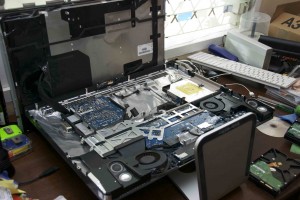
A few years ago we switched to using Macs for all our computing needs and have never looked back. They have been really reliable and serve our computing needs perfectly. I had a pretty serious scare with our desktop computer a few months ago when we came home from a month-long trip to Luzon to find that our computer wouldn’t start up.
I noticed the screen was foggy on the inside and nothing would work. I tried booting the Mac in Windows and it gave me a stern warning that I would be a fool to continue booting because it thought my hard drive was about to explode and take the computer with it. At least that was how I translated all the wierd PC talk in the warning message.
I decided it was a good idea to get a new hard drive since the computer is an extremely integral part of our ministry, we couldn’t let it crash and risk losing important data. So I was forced to do a very, very scary job and replace the hard drive myself. If you’ve seen an iMac before, you know that it only has one external screw. The rest are buried under the glass of the display.
I was desperate so I popped the glass out with a suction cup (which I found out is very easy because it is held in with magnets) and removed roughly 24 screws, the display and a few connectors and viola, new hard drive installed. I reassembled it all, and restored my hard drive image. The whole process took about 30 minutes, and then about an hour and a half of waiting for the image transferring. The image transfer was interrupted when the power went out today, and my battery backup was still pretty dead since didn’t have time to recharge from the power outage the night before.
I ran outside and started up the dilapidated generator, waffle iron and fan. I ran back inside, plugged in a voltage regulator and my uninterruptible power supply with the dead battery saying I had less than a minute of backup power, and was able to continue the restoration…until the generator choked on a flake of rust (I presume) and ended the whole process. Oh well. Four hours later the power was back on and I was able to finish it off. Ultimately I think I worked about 30 minutes on the computer and about an hour saying encouraging words to our generator as it tried its best to keep the process going, followed by a whole string of discouraging words when it finally died. Now if only Apple made generators…
In Defense of my failing Mac hard drive for all those who will say, “See Macs are junk!”
1. The drive is made by Western Digital not Apple.
2. After finding the Windows message, I decided to leave the computer on the Mac OS bootup screen for the night hoping as it warmed up it would dry out from being left on a desk in the humidity. To my pleasant surprise, it booted up in the morning and never gave me another problem. I still decided it was a good idea to get a hard disk to have on hand if my existing one ever failed…which it has yet to fail. In the end the Windows diagnosis was wrong, and I guess you could say the Mac diagnosis of “just sit there while I churn for hours and appear to do nothing, but what I am really doing is drying myself out” method was right.
3. By changing the HD I learned that the fogged screen was simply on the inside of the glass, which i now know can be removed very easily so it can air out. I leave our computer in “Sleep Mode” all the time because of the humidity and don’t have problems, but leaving as long as we did it was unplugged and the tropics got the best of it when every day is on the edge of 100% humidity.